 HubSpot
What does it mean to keep a CRM up to date automatically ?
Short answer: automatic CRM updates are useful when a known event produces a predictable change. A workflow can copy a verified value, format a phone number or set a review date. It should not guess at important facts or overwrite a value without a source, an owner and an exception path.
A CRM rarely becomes outdated because people do not care. A rep finishes a call, an import adds companies, a form creates contacts, and the next task gets attention. The data change is real, but the record does not always change with it.
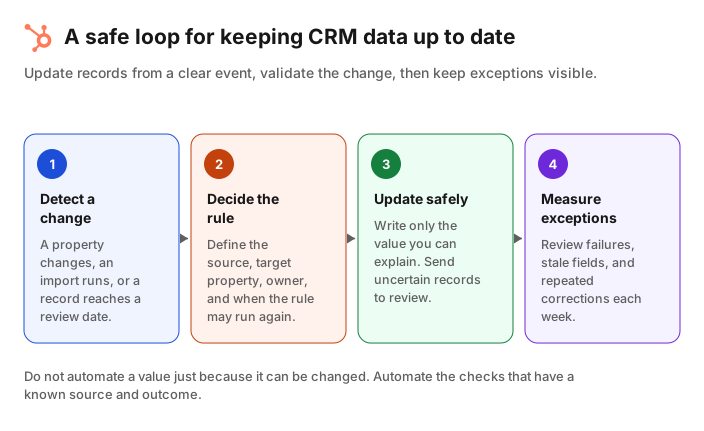
The aim is not to make every property move by itself. It is to remove repeated, low-risk updates and make uncertain records visible to the person who can decide. That distinction keeps an automation from becoming a quieter version of the problem it was meant to solve.
HubSpot workflows can update or clear properties on the enrolled record and, where the association exists, on an associated record. The available actions and subscriptions vary, so check what your portal supports before you make a process dependent on it. HubSpot documents the Edit record workflow action and its limits.
Start with the updates that have a reliable source
Short answer: begin with one property whose source and expected value are clear. Good first candidates include formatting a phone number, copying an approved company field to an associated record, or setting a review date after an event. Do not start with job titles, lifecycle stages or ownership unless you can explain every case.
Make a short list of fields that affect a real decision: routing, segmentation, reporting, renewal, suppression or handoff. For each one, answer four questions before you build a workflow:
- What event tells us the value changed ?
- Which system or person is the source of truth ?
- What exact value should be written, and what value must never be replaced ?
- Who reviews an update that the rule cannot handle ?
A company country copied from a verified company record to its associated contacts is a clear example. A contact's seniority inferred from a free-text job title is not. The first has a defined source and outcome. The second needs a confidence threshold and a review path.
HubSpot's property insights can help identify where properties are used and which ones have quality issues. Use that information to choose properties that actually change a workflow, not simply properties with empty cells.
Create a Jipup account and connect HubSpot for a free read-only CRM audit. See duplicate records and data gaps before you choose what to automate. 250 free credits, no credit card.
Build an update rule before you build a workflow
Short answer: write the rule in one sentence before opening the workflow editor: “When this event happens, use this source to update this property, unless this exception applies.” If that sentence is vague, the automation will be vague too.
A useful rule has five parts:
| Part | Example | Why it matters |
|---|---|---|
| Trigger | A company’s industry is updated | Defines when the check runs |
| Source | The company Industry property | Makes the value auditable |
| Target | Industry on associated contacts | Defines where it is written |
| Guardrail | Only update when the source is known | Prevents blank values from replacing good data |
| Exception | Send conflicting values to a review queue | Keeps ambiguous records visible |
In HubSpot, start at Automation > Workflows, create or open the relevant workflow, set enrollment triggers, then add CRM > Edit record. When you update an associated record, the association must already exist. HubSpot also notes that source and target properties need compatible types when a value is copied.
For a rule that should keep running as data changes, review re-enrollment deliberately. HubSpot lets records re-enroll when a property gains a value or changes from one value to another. A re-enrollment setting can keep a simple synchronization current, but it can also create repeated writes if you use the same property as both trigger and output. Test the rule with a small record set before turning it on for the full database.
Use validation to stop bad data at the point of entry
Short answer: prevention is more reliable than a cleanup workflow. Add validation where people enter data, then use automation to format or route records that already meet your rule. Validation rules do not retroactively fix historical values, so plan a separate cleanup for those records.
A workflow is not the only way to keep data current. HubSpot property rules can enforce a format when a user edits a record or when data is imported. For example, a number field can have a minimum or maximum value, and a text field can limit characters or require a unique value. Check the official validation rules documentation for the field types and exceptions that apply to your portal.
Be precise about the gap that validation does not cover. HubSpot says some validation rules are not enforced for workflows, chatflows, meeting-scheduling submissions or legacy form submissions. The exact rule also depends on the property type. Do not assume a rule that protects a manual edit also protects every integration or workflow write.
For records that need standard formatting, HubSpot's Format data workflow action prepares a value and can pass it to an Edit record action. The Format data guide describes the two-step process. This is a good fit for repeatable transformations, such as a known date format, not for guessing whether two similar companies are the same business.
Keep humans in the loop for uncertain updates
Short answer: automate a change only when the evidence and result are clear. For conflicts, low-confidence enrichment or a field with downstream consequences, assign a review task or queue instead of writing the value immediately.
Some changes look simple until they reach an edge case. A company may have a new domain because it rebranded, or because an integration mapped a subsidiary to the parent. A role change may be a promotion, a temporary title or a false match. A lifecycle stage may be updated by a campaign, while a sales rep is working an active deal.
Use a review queue when a rule encounters one of these situations:
- A source value conflicts with a value entered by the record owner.
- The update would affect routing, ownership, lifecycle stage or a compliance field.
- A source is missing, stale or has no clear match to the record.
- An enrichment result is plausible but not enough to make a business decision.
This is where an agent can help without taking over decisions. A Jipup agent can continuously identify CRM data issues such as job changes, missing contact or company data, duplicates and enrichment gaps. Start with a read-only audit, define the fields and rules, then review sensitive changes before they are applied. Jipup supports HubSpot and Salesforce, so the workflow should be based on the crm behavior your team actually uses.
Monitor the automation, not just the records
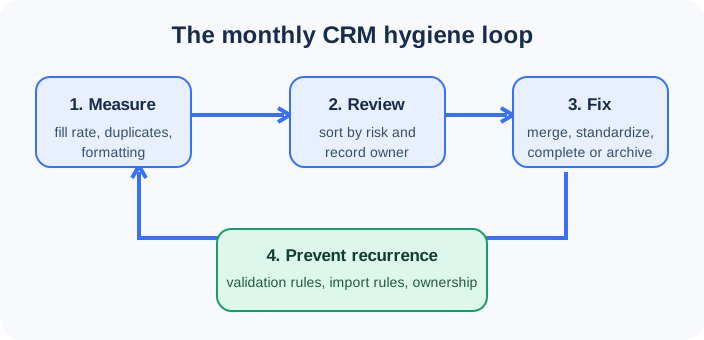
Short answer: review your automations weekly at first. Track how many records were updated, skipped, sent to review and corrected afterward. A rising number of exceptions is a signal to fix the source or change the rule, not to hide the exceptions.
A workflow that completes without errors can still produce bad data. Create a simple scorecard for each important rule:
| Measure | What it tells you | What to do next |
|---|---|---|
| Records updated | How often the rule is used | Check that the volume matches the trigger |
| Records skipped | How often a guardrail stopped a write | Review whether the guardrail is too strict or the source is incomplete |
| Records sent to review | Where automation meets ambiguity | Assign an owner and look for repeated patterns |
| Corrections after automation | Whether the rule produces the expected result | Fix the rule or the upstream source |
HubSpot's Data Quality overview groups signals for duplicates, formatting issues, enrichment coverage and property insights. Its data quality tools also support a weekly digest for recent changes and issues, subject to the features available in your subscription. Use the digest as an alert, then inspect the underlying records before changing an automation.
If the same exception appears each week, work backward. The problem may be a form field, import mapping, integration, handoff or property definition. Updating the record repeatedly treats the symptom. Updating the source keeps the CRM current with less work next month.
A 30-day plan for CRM update automation
Start small enough that you can see every outcome. This sequence works better than launching several workflows at once:
- Week 1: choose one property. Pick a field with a clear business use and source. Document the trigger, target, owner and exception.
- Week 2: test on a small segment. Use records your team can inspect. Check the before and after values, associations and workflow history.
- Week 3: add guardrails. Add checks for blank sources, conflicting values and re-enrollment. Decide where exceptions go.
- Week 4: review the results. Compare updates, skips and corrections. Keep the rule, refine it, or turn it off if it does not produce a reliable outcome.
After one rule works, choose the next one from the same workflow. A stable sequence of small, observable updates is easier to trust than one large automation that writes to many properties at once. If manual CRM maintenance is already taking too much time, use a Jipup audit to identify the highest-impact data issues before adding more rules.
FAQ
Can a CRM update itself automatically ?
Yes, a CRM can update properties automatically when a workflow has a trigger and a reliable source value. The safe use cases are predictable changes, such as copying an approved property, formatting a known value or setting a date. Uncertain information should go to review.
How do I keep my HubSpot CRM up to date ?
Start with the properties that affect routing, segmentation or reporting. Add validation at entry, build a workflow for one predictable update, and review exceptions every week. Use HubSpot's Data Quality tools to check duplicates, formatting issues and property usage.
What should not be automated in a CRM ?
Do not automatically overwrite values that have no trustworthy source or that affect high-stakes decisions. Ownership, lifecycle stage, legal status and ambiguous job changes often need a guardrail and human review.
Can HubSpot workflows update associated records ?
Yes. HubSpot's Edit record action can update properties on the enrolled record or an associated record when the association exists. Source and target property types must be compatible when copying a value.
Do HubSpot validation rules fix old data ?
No. Validation rules control eligible new edits and imports, depending on the rule and entry method. They do not retroactively format existing values, so use a separate review or cleanup process for historical records.
How often should I review CRM automations ?
Review a new automation weekly for its first month. Track updates, skips, exceptions and corrections. Once the results are stable, include it in a monthly CRM hygiene review and revisit it whenever an integration, form or process changes.
Where Jipup fits
Create a Jipup account and connect HubSpot for a free read-only CRM audit. See duplicate records and data gaps before you choose what to automate. 250 free credits, no credit card.

Co-founder of Jipup, the AI agent that keeps HubSpot CRMs clean, up to date and enriched. He works every week with RevOps and sales teams on their CRM data.