 Clay
 Apollo
 HubSpot
 Jipup
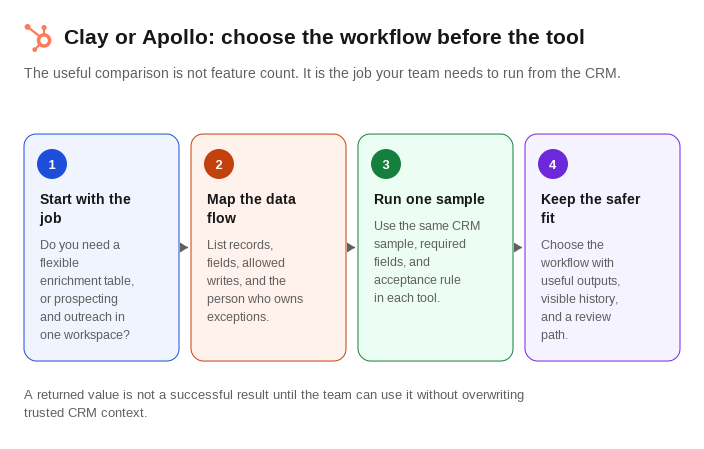
If you are comparing Clay vs Apollo for a HubSpot team, do not start with a list of AI features. Start with the work that needs to happen after a record enters your CRM. Do you need a flexible table to research and enrich a selected list, or one workspace that combines prospecting, sequences, and CRM sync ?
Clay documents HubSpot actions to import, look up, create, and update CRM objects. Apollo documents separate HubSpot CRM and HubSpot Data Enrichment integrations, along with field mappings and data-writing rules. Both can affect records. The practical difference is the operating model your team is willing to own.
This guide gives you a decision framework for a HubSpot pilot. It compares the documented workflows, not vendor claims about universal data accuracy. Run the same sample through each option, protect trusted CRM values, and choose the tool that creates a useful next step without hiding exceptions.
What is the main difference between Clay and Apollo ?
Short answer: Clay is useful when you need to assemble a tailored enrichment or research workflow around selected records. Apollo is useful when your team wants prospecting, outreach, and CRM operations in one platform. The right choice depends on the workflow, not a scorecard.
Clay's HubSpot integration documentation describes importing HubSpot objects into a Clay table and using actions to create, look up, or update objects. Its CRM enrichment guidance distinguishes read-only lookups from create and update actions that change CRM records.
Apollo's HubSpot integration overview separates a CRM integration, which can sync contacts, accounts, and deals, from a data-enrichment integration for existing HubSpot records. Its platform also lists prospecting, sequences, workflows, and CRM integrations in its current plans.
That difference leads to a simple first question. If the outcome is "research this defined CRM segment, enrich selected fields, and pass exceptions to RevOps," compare the flexibility and governance of the enrichment workflow. If the outcome is "find prospects, run outreach, and keep sales activity connected to HubSpot," compare the all-in-one sales workflow.
| Decision | Clay may fit better when | Apollo may fit better when |
|---|---|---|
| Primary job | You need a tailored research or enrichment table | You need prospecting and sales execution in one workspace |
| CRM setup | You want to define individual lookup, create, and update actions | You want to configure a CRM sync or enrichment integration |
| Writing policy | You need to inspect a workflow before enabling a write step | You want field mappings and auto-fill or overwrite rules in the integration |
| First pilot | A selected list has a clear enrichment question | A sales motion needs data, sequences, and CRM context together |
The table is a starting hypothesis, not a verdict. The Clay documentation and Apollo documentation should be checked again in your own account, because available plans, permissions, and settings can differ.
Create a Jipup account and connect HubSpot or Salesforce. Start with a read-only audit, then choose the fields and records worth enriching. 250 free credits, no credit card.
How do Clay and Apollo work with HubSpot ?
Short answer: Both tools need a deliberate HubSpot configuration. In Clay, distinguish read-only lookups from create and update actions. In Apollo, map fields and choose data-writing rules before enrichment or sync runs. Do not treat an integration connection as a safe default.
In Clay, the official HubSpot guide says a team can import and manage HubSpot objects from a Clay table. Clay's action guide says Lookup actions pull data into Clay without changing HubSpot, while Create and Update actions write to HubSpot. That makes the direction of each step visible in the workflow.
In Apollo, the official HubSpot Data Enrichment guide tells teams to check default field mappings, map additional fields where needed, then set Auto-fill and or Overwrite rules. It also notes that selecting records and clicking "Enrich records" overrides configured auto-fill, overwrite, or push settings for the enriched field.
Use a small pilot before enabling either configuration:
- Choose 50 to 100 records. Include complete records, incomplete records, and records from the countries and segments your team actually works.
- Define the required fields. For example, a verified work email, employee range, or a job-change signal. Avoid a vague goal such as "better data."
- Record the starting value and source. You need this to spot a wrong overwrite, not just a blank result.
- Start with blank-fill behavior. Keep manually maintained fields, ownership, lifecycle stages, notes, and deal context outside the pilot unless there is an explicit rule.
- Review outputs record by record. Mark each result accepted, rejected, or requiring review.
- Inspect the history and exceptions. Confirm that a teammate can explain where a changed value came from and reverse or correct it through the documented process.
Apollo's field mapping guide and Clay's action documentation make the same operational point: mapping is part of data quality. A connection that is technically working can still write a value to the wrong property.
Which tool is better for CRM enrichment ?
Short answer: Choose the tool whose workflow lets you use the inputs you have, apply the acceptance rules you need, and keep uncertain results visible. A provider returning more values is not automatically better if those values cannot be safely written or used.
For Clay, a good test is whether you can build the sequence your records need. Clay documents enrichments that can run in a table and recommends using a contact ID to connect CRM data to enrichment work. Its CRM enrichment lesson describes using lookup actions first and using waterfall enrichment when one source cannot provide complete data.
For Apollo, test its documented CRM enrichment flow. The pricing page currently lists CRM enrichment, API enrichment, and waterfall enrichment on paid plans, while availability differs by plan. The official data-enrichment guide provides the path Settings > Integrations > HubSpot, then field mapping and data-writing rules before CRM enrichment.
For either option, evaluate four measures from the same sample:
| Measure | What to count | Why it matters |
|---|---|---|
| Usable coverage | Accepted values for each required field | A returned value is not useful if the team rejects it |
| Safe writes | Accepted changes with the correct property and owner | A good value in the wrong field creates new CRM work |
| Exceptions | Records with conflicting, missing, or uncertain results | Exceptions show where a workflow needs a review path |
| Cost per accepted outcome | Credits and seats used for accepted outputs | A low entry price can hide a costly process at volume |
Do not compare generic coverage percentages from marketing pages with your CRM sample. Your match rate depends on the identifiers you supply, the markets you cover, the fields you require, and your definition of an acceptable value.
If you would rather avoid maintaining enrichment sources, field rules, and exception handling by hand, Jipup provides data-quality agents for HubSpot and Salesforce. Start with a read-only CRM audit, decide which fields deserve attention, and test a narrow rule before any broader run. The same standard applies: useful data, safe writes, and an exception process your team can inspect.
How should you compare Clay vs Apollo pricing ?
Short answer: Compare the total workflow cost, not only a monthly starting price. Include the plan features you need, the credits consumed by enrichment, the number of users, and the time needed to review exceptions and maintain the integration.
Clay's current pricing page describes plans with actions and data credits. It says data credits start at $0.05 each and that some AI use can be fixed-price or variable, depending on the model and task. This means a Clay pilot should measure the actual enrichment sequence you intend to run, not a generic credits estimate.
Apollo's current pricing page lists a free plan, then Basic at $49 per seat per month billed annually and Professional at $79 per seat per month billed annually. It lists credits, CRM integrations, and enrichment capabilities with plan-specific availability. Prices and features can change, so confirm the current plan in the product before committing.
Build a small comparison sheet with these inputs:
- Records per month: split one-time backfill records from ongoing records.
- Required outputs: list each field or action that consumes credits or needs a paid capability.
- Seats: include the people who build, review, and operate the workflow, not only the person who starts it.
- Rejected outputs: include the credit or labor cost of records the team cannot use.
- Maintenance time: include mapping changes, retry handling, and recurring quality reviews.
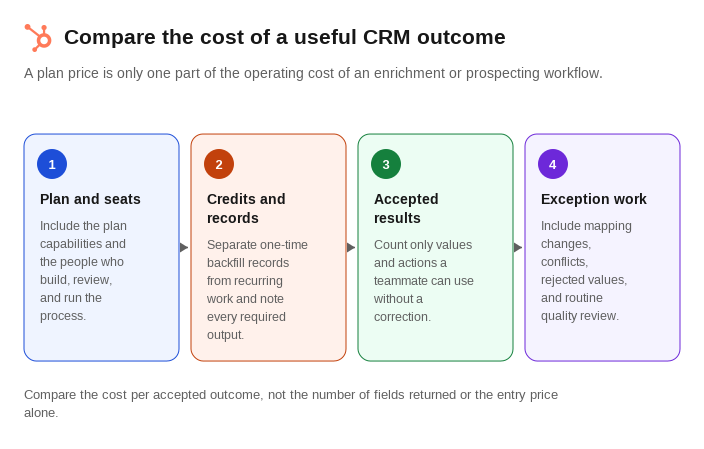
This prevents a common mistake. A workflow can look cheaper because it fills many fields, while requiring hours of cleanup because its accepted-output rate is low. The useful unit is the cost of a reviewed, usable outcome.
What should a HubSpot team decide before connecting either tool ?
Short answer: Decide which records may move, which properties may change, what source wins when values conflict, and who reviews failures. These choices matter more than the vendor choice because they define whether automation improves or degrades your CRM.
Write the operating rules before connecting a production portal:
- System of record: HubSpot should remain the place where owners, lifecycle decisions, and business context are clear to the team.
- Write permissions: separate fields that can be blank-filled from fields that can be overwritten, and keep sensitive context out of automatic updates.
- Conflict rule: decide what happens when a returned job title, company name, or domain disagrees with a trusted existing value.
- Duplicate rule: use an existing-record lookup before a workflow creates a new contact or company.
- Review route: send unclear records to a named owner or queue, rather than silently dropping or writing them.
- Success measure: agree on the decision that the enriched data should improve, such as routing new accounts or preparing a focused outbound list.
Apollo's documentation says that mapping can be configured with auto-fill and overwrite rules. Clay's documentation distinguishes lookup from create and update actions. Those documented controls are useful only when your team has decided the policy behind them.
FAQ
Is Clay better than Apollo ?
Neither tool is better for every team. Clay can suit a tailored enrichment or research workflow. Apollo can suit a team that wants prospecting, outreach, and CRM operations in one platform. Test the workflow on the same HubSpot sample before deciding.
Can Clay write to HubSpot ?
Yes. Clay's official HubSpot documentation describes create and update actions for HubSpot objects. Its documentation also distinguishes those writing actions from Lookup actions, which read data without changing the CRM.
Can Apollo enrich HubSpot records ?
Yes. Apollo documents a HubSpot Data Enrichment integration for existing HubSpot records. Before enriching, review field mappings and data-writing rules, including auto-fill and overwrite behavior.
Does Apollo integrate with HubSpot ?
Apollo documents a HubSpot CRM integration that can sync contacts, accounts, and deals, plus a separate HubSpot Data Enrichment integration. Check the current permissions, plan, and configuration requirements in Apollo's official documentation.
Is Clay or Apollo cheaper ?
The answer depends on the workflow. Clay uses actions and data credits, while Apollo lists per-seat plans and credits with different capabilities by plan. Compare the cost of accepted, usable results from your own sample rather than monthly list prices alone.
Should I let Clay or Apollo overwrite CRM data automatically ?
Not at the start. Begin with a small sample and blank-fill rules, then review each accepted change. Enable overwrites only for fields with a documented source, owner, conflict rule, and correction path.
Where Jipup fits
Create a Jipup account and connect HubSpot or Salesforce. Start with a read-only audit, then choose the fields and records worth enriching. 250 free credits, no credit card.

Co-founder of Jipup, the AI agent that keeps HubSpot CRMs clean, up to date and enriched. He works every week with RevOps and sales teams on their CRM data.