 Jipup
If you are looking for a Clearbit alternative, start with the job Clearbit used to do in your CRM. Did it enrich new form submissions, fill missing company fields, identify visitors, or keep a working list current ? Each job needs a different test. A vendor comparison alone will not tell you whether its returned values are usable in your records.
Today, HubSpot provides enrichment through Breeze Intelligence. Its current enrichment documentation lets an account configure automatic enrichment for new records, continuous updates for previously enriched records, property mapping, and overwrite behavior. That makes the first decision less about replacing a brand and more about choosing the right operating model.
This guide gives you a practical decision process: inventory the fields you need, test a sample, protect trusted values, and measure accepted results. It also covers when a managed multi-source workflow is more useful than a native subscription.
Is Clearbit still available ?
Short answer: Clearbit is no longer the standalone product most teams knew. HubSpot now offers data enrichment as Breeze Intelligence. Before switching providers, confirm which of your former use cases are covered by your HubSpot subscription and which need a separate workflow.
The answer matters because a replacement should be judged against the job, not the old product name. HubSpot's Breeze Intelligence billing guide describes a credit-based system for enriching contact and company records. One credit covers one record enrichment, with a maximum of one credit per record in a monthly usage period. Credits reset every 30 days and do not roll over.
For teams already working in HubSpot, native enrichment can be the simplest starting point. HubSpot documents controls for automatic enrichment, monthly continuous enrichment, mappings, activity history, and reverting enrichment changes. Those controls are useful when your primary requirement is to add or refresh a limited set of properties without exporting records.
But a native option is not automatically the best Clearbit alternative for every task. It may not cover the fields, markets, inputs, or workflow you need. Make that gap explicit before you pay for more credits or move records through another tool.
Start with the CRM outcome, not a vendor list
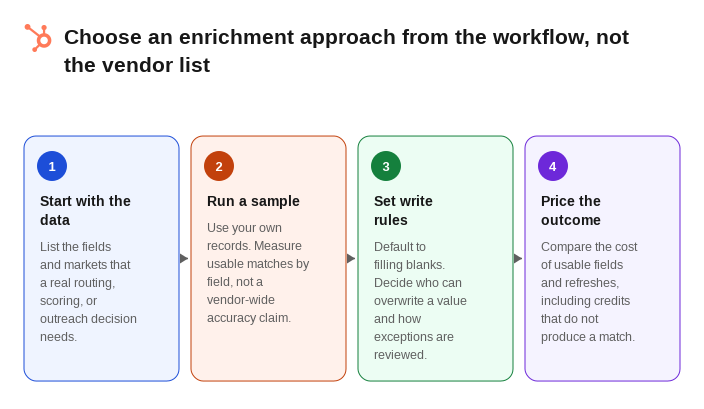
Short answer: Define one business decision that better data should improve. Then list the exact fields, record inputs, countries, write permissions, and refresh frequency it needs. This turns a vague Clearbit replacement search into a test you can run.
A useful outcome is specific. “Improve data quality” is too broad. “Route new US company records by employee range and industry within one day” is testable. So is “find a usable work email for contacts that already have a company domain.”
Create a one-page brief before booking demos:
- Name the workflow. State who uses the enriched field and what they decide with it.
- List the required inputs. A company domain, work email, and legal company name are stronger starting points than a name alone.
- List the allowed outputs. Separate fields you may fill from fields that need a review, such as job title or company ownership.
- Set the market. Record the countries and segments represented in your CRM sample.
- Choose a refresh rule. Decide whether a one-time backfill, enrichment at creation, or a periodic refresh is actually needed.
- Set an acceptance test. Define what a useful result looks like for each field. A returned value is not a success if the team cannot use it.
HubSpot's mapping settings show why this matters. Its official guide lets admins select “Fill empty values only,” “Fill empty values and overwrite existing values,” or “Do not fill any values” for a property. A team should make the same decision regardless of which Clearbit alternative it evaluates.
Create a Jipup account and connect HubSpot or Salesforce. Start with a read-only audit, then choose the fields and records worth enriching. 250 free credits, no credit card.
Three Clearbit alternative paths to compare
Short answer: Most teams should compare three paths: native CRM enrichment, a specialist data provider, and a managed or self-built multi-source workflow. The right path depends on how much control, maintenance, coverage, and safe writing your process needs.
| Path | Works best when | What to test first | Main trade-off |
|---|---|---|---|
 HubSpot Breeze Intelligence | Your records and workflows already live in HubSpot | Required properties, credit use, mapping, and activity history | Coverage and configuration stay within the native product |
| A specialist provider | You need a defined dataset or market that native enrichment does not cover | Useful results on your own sample, not a vendor-wide accuracy claim | You still need to map, govern, and refresh CRM values |
| A multi-source workflow | One source leaves too many required fields blank | Source order, costs, conflict rules, and exception handling | More components need clear ownership |
Do not treat a comparison page as proof that any path will work on your records. Take a representative sample of 100 to 300 contacts or companies. Include recent records, older records, incomplete inputs, and the markets that matter to your team. Run the same sample through each option using the same required fields.
Record four numbers: usable matches by field, records that need review, cost per accepted output, and values you rejected. These are more useful than an advertised database size. They also reveal whether a missing result comes from the provider or from weak input data in the CRM.
How to test HubSpot Breeze Intelligence safely
Short answer: Start with a limited sample and blank-fill rules. Review the activity log and mappings before allowing overwrites or automation. HubSpot provides options for automatic, continuous, and manual enrichment, but each mode needs its own write policy.
HubSpot's current documentation says that automatic enrichment can apply to new records from forms, integrations, or manual creation. It also describes continuous enrichment for existing records when new data becomes available. Before turning either on, define which properties are safe to update.
Use this sequence:
- Open Settings > Data Management > Data Enrichment. Confirm who has enrichment access and who owns the configuration.
- Choose a small record sample. Do not begin with the whole CRM or every property.
- Map only the fields required by the workflow. Use a custom property only when its type and allowed values are ready for the data.
- Start with “Fill empty values only.” Protect values entered by a person or a trusted integration until your sample proves otherwise.
- Review the Activity tab. HubSpot documents that enrichment activity can be reviewed and that selected changes can be reverted.
- Measure accepted values. Compare the results with the workflow brief, not with the number of records processed.
- Decide whether continuous updates are justified. Monthly updates are useful for fields that change, but they are unnecessary for stable fields with no business use.
The same guide notes an important exception: some workflow actions can overwrite properties regardless of the mapping rule. Check the action configuration before enrolling a large list. This is exactly the type of detail a Clearbit replacement project should test before it becomes an unattended CRM process.
When a multi-source workflow is a better fit
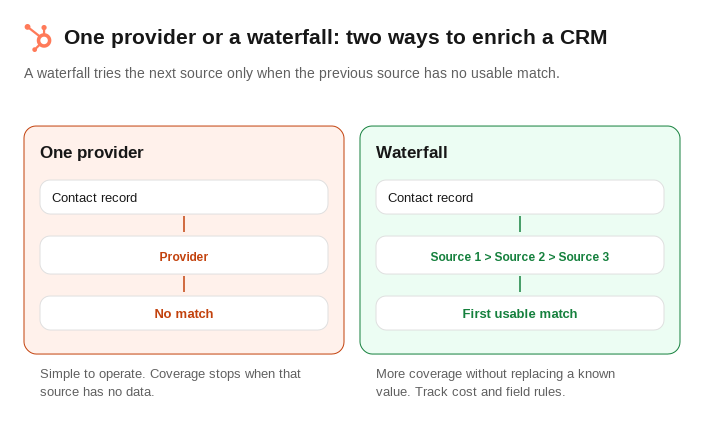
Short answer: Use a multi-source workflow when a single source leaves a material gap in the fields your process needs. It should try the next source only after the first result fails your acceptance rule, then log conflicts and leave uncertain values for review.
A waterfall is not a promise that every empty property can be filled. It is a controlled sequence. For example, a workflow can try a source with a company domain, validate the returned industry and employee range, then try another source only if one of those fields is missing or unsuitable.
The benefit is broader coverage on a defined sample. The risk is writing the first available value into a trusted CRM property. Set the rules first:
- Which field must be present before the next source runs ?
- Which source owns a value if two sources disagree ?
- Which values can fill blanks, and which can overwrite ?
- Which results go to a review queue ?
- How much can the workflow spend per accepted record ?
If you would rather not maintain source order, mappings, and exception logic by hand, Jipup offers a managed data-quality workflow for HubSpot and Salesforce. Start with its read-only CRM audit, scope the fields that support a real workflow, and keep the first run narrow. Jipup should be evaluated by the same test: accepted data, safe writes, and clear exceptions.
How to choose between a one-time backfill and continuous enrichment
Short answer: Use a one-time backfill to establish a usable baseline, then apply continuous enrichment only to fields that change and affect a live workflow. Continuous updates without field ownership create noise rather than better CRM data.
A one-time backfill works well when your team needs to normalize a known segment before a migration, territory review, or campaign. It has a clear start and end, and it is easier to sample and approve. Keep a copy of the inputs, outputs, source, date, and write rule for each run.
Continuous enrichment is different. It is an operational process. Choose it for fields such as job title or company context only when someone owns the downstream workflow and can handle conflicts. HubSpot's documentation states that its continuous enrichment updates previously enriched records monthly when new data becomes available. That makes it worth reviewing the acceptance rule and activity history on a regular schedule.
For either model, do not confuse coverage with quality. A blank field can be safer than an outdated or mis-mapped value. Protect personally entered notes, deal context, ownership, and lifecycle decisions unless your policy specifically permits a change.
FAQ
What is the best Clearbit alternative ?
There is no universal best option. HubSpot Breeze Intelligence is a logical baseline for teams already using HubSpot. The right alternative depends on the fields, markets, record inputs, write rules, and refresh process you need.
Is Clearbit now Breeze Intelligence ?
Clearbit's former enrichment use cases are now offered through HubSpot Breeze Intelligence. Confirm the current feature, subscription, credit, and configuration details in HubSpot's official documentation before choosing a replacement process.
How much does HubSpot Breeze Intelligence cost ?
HubSpot uses a credit-based model for Breeze Intelligence. Its official billing guide lists monthly credit tiers and explains that credits reset every 30 days without rollover. Check the current pricing page or your account for the plan that applies to you.
Should I replace Clearbit with a waterfall enrichment tool ?
Consider a waterfall when one provider cannot return enough usable data for the fields you need. Test it on the same CRM sample as the native option and define source order, cost limits, overwrite rules, and review handling before automating it.
Can enrichment overwrite existing CRM data ?
It can, depending on the mapping and action configuration. HubSpot supports blank-only filling and overwrite rules, and its documentation notes that some workflow actions may overwrite regardless of a mapping rule. Test this on a small sample first.
What should I measure in an enrichment test ?
Measure accepted outputs by required field, records that need review, rejected values, and cost per accepted output. Do not rely only on the percentage of records that returned any value.
Where Jipup fits
Create a Jipup account and connect HubSpot or Salesforce. Start with a read-only audit, then choose the fields and records worth enriching. 250 free credits, no credit card.

Co-founder of Jipup, the AI agent that keeps HubSpot CRMs clean, up to date and enriched. He works every week with RevOps and sales teams on their CRM data.