 HubSpot
What is CRM hygiene ?
Short answer: CRM hygiene is the recurring work of keeping records accurate, complete, consistently formatted and usable. In HubSpot, that means reviewing duplicate records, formatting issues, missing values, stale properties and the rules that create new records. A one-time cleanup helps, but a monthly routine stops the backlog from returning.
CRM hygiene is not a separate admin project. It is the maintenance that makes your pipeline, segments and reports usable. A contact with an old role, a company without a domain, and two copies of the same buyer each create a different reporting problem. Treating them as one generic "bad data" problem makes the work harder to prioritize.
HubSpot's data quality overview already groups several useful signals: duplicates, formatting issues, enrichment coverage and property insights. Use it as the starting point, then decide which records deserve a human decision and which rule should prevent the next issue.
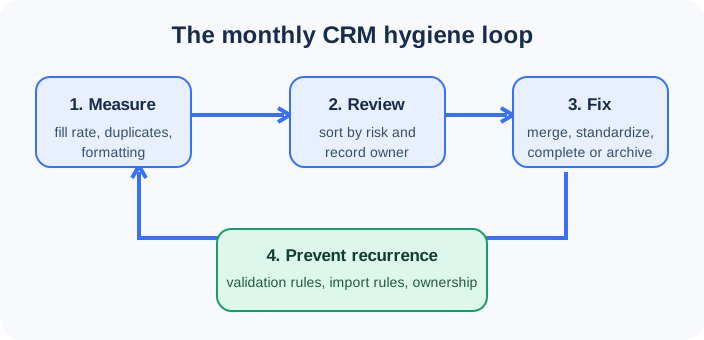
The monthly CRM hygiene checklist
Short answer: reserve one focused session each month. First measure the change in duplicates, formatting and completeness. Then review the riskiest records, fix them with an owner, and document one prevention rule for every recurring issue. Run the same checklist after a large import, integration change or event.
The checklist below is deliberately short. It gives you a repeatable sequence without pretending that every incorrect field has the same business cost.
1. Measure the issues before editing records
Open Data Management > Data Quality in HubSpot. Set a date range that lets you compare with the previous month. Record four numbers in a simple shared sheet or dashboard:
- Duplicate contacts and companies waiting for review.
- Formatting issues, especially on properties used in personalization or routing.
- Fill rate for the fields your team needs to qualify, route and report on.
- Properties or workflows that are no longer used.
HubSpot's overview can show duplicate and formatting issue changes, recommended actions, and property insights. It also lets eligible users view enrichment coverage. The exact tools available depend on subscription and permissions, so confirm what your portal exposes before making the checklist a team commitment.
Do not chase a perfect score. A missing mobile phone may not block a B2B sales motion. A missing company domain can break account matching. Pick the fields that affect a real workflow: assignment, segmentation, reporting, suppression, renewal or outreach.
2. Review duplicates before you merge them
Go to Data Management > Data Quality > Manage Duplicates, or use CRM > Contacts or Companies > Actions > Manage duplicates. HubSpot compares records as they are created and also runs a daily check when no records were created that day. It can surface likely duplicate contacts and companies for review.
HubSpot automatically prevents duplicate contacts with the same email and duplicate companies with the same primary domain. That does not catch every real duplicate. One person can use a work address in an import and a personal address in a form. One company can arrive with a parent domain, a local domain and a spelling variant.
For each pair, ask three questions before merging:
- Are these genuinely the same person or company ?
- Which record has the values your team should keep ?
- Will the merge affect an association, integration or report that needs a follow-up ?
A shared switchboard number, two people with the same name, and a parent company with a subsidiary can look similar without being duplicates. Reject those pairs instead of forcing a merge. HubSpot says rejected suggestions no longer appear in the duplicates tool, so only reject after checking enough context.
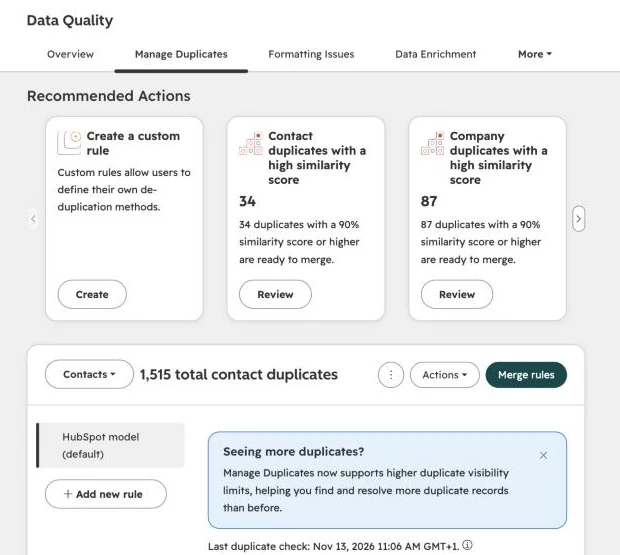
For the actual merge, HubSpot lets you choose the record and properties to retain in the review flow. Merges cannot be reverted. If you need the detailed decision rules and the effect on values, read our guide on merging contacts in HubSpot without losing data.
Create a Jipup account and connect HubSpot: the free read-only audit shows duplicate contacts and companies before you change a record. 250 free credits, no credit card.
3. Fix formatting and standardization issues
The same value should not appear as US, U.S., United States and USA if your territories, reports or workflows depend on it. Standard formatting is usually a higher-return task than trying to complete every optional property.
In Data Management > Data Quality > Formatting issues, HubSpot lists records with detected formatting problems. Users can accept or reject an individual recommendation. On eligible Data Hub plans, teams can bulk-manage issues and set automations for current records with the same problem.
Start with a narrow group of fields:
| Field type | Practical standard | Why it matters |
|---|---|---|
| First and last name | Normal capitalization, no placeholders | Personalization and search |
| Country and state | One agreed picklist or naming convention | Territory reporting and routing |
| Phone number | One international or local format | Calling and deduplication |
| Job title | Preserve the source text, normalize only clear variants | Segmentation without losing meaning |
Review the result after an automated formatting rule runs. HubSpot notes that a record later updated manually, through an API, an integration, import or migration may not be flagged again by the data quality tool. The prevention step matters as much as the correction.
4. Complete the fields that power a workflow
Missing data is only a hygiene issue when someone needs the field for an action. Work backward from the action, not from a generic completeness target.
For example, a lifecycle workflow may need a company domain and country. A routing workflow may need owner, market and employee band. A renewal report may need a close date and association. Build a monthly view of records that are missing those specific properties, then assign an owner for the next action:
- Ask the record owner to complete a value that only they know.
- Enrich a company or contact where external data is appropriate.
- Mark a property as not applicable when that is the truthful answer.
- Archive a field that has no decision attached to it.
HubSpot's property insights show where properties are used and how much data is available. That makes it easier to distinguish a useful field from a field that survives only because it once existed.
If checking the same gaps by hand every month is becoming the work, a Jipup agent can continuously identify and work through CRM data issues, including duplicate records, job changes, missing contact or company data and enrichment. Keep the scope explicit: start with a read-only audit, define the fields and rules, then review sensitive changes before they are applied.
5. Archive what no team owns
A CRM can be technically complete and still be hard to use because it has too many properties, lists and workflows. During the monthly review, identify fields that nobody uses for reporting, segmentation, automation or a handoff.
Before archiving anything, check the property usage and ask the owner of the dependent process. HubSpot recommends using property insights and unused-workflow reviews as part of maintaining a trusted data source. Archive only after you know the field is not needed for a historical report, integration or compliance process.
A useful rule is simple: every required property needs an owner, a reason it is collected, a valid format and a process that uses it. If you cannot name those four things, do not make the field mandatory for everyone.
How often should you run CRM hygiene ?
Short answer: run the core checklist monthly, and run a smaller version after any event that changes records at scale. Large imports, new forms, new integrations, territory changes and migrations deserve a check within days, not at the next quarter.
Monthly works for most B2B teams because it is frequent enough to catch recurring issues while the source is still clear. Weekly may make sense when the CRM receives a high volume of leads or when multiple integrations create and update records. Quarterly is usually too slow for duplicates and routing fields, but can work for property cleanup and governance review.
HubSpot offers a weekly data quality digest that can summarize recent data changes, property issues, duplicates and formatting suggestions. Use it as an early-warning signal, not as permission to skip the monthly session.
Make CRM hygiene a workflow, not a cleanup project
Short answer: assign an owner to each data domain, prevent bad values at entry, and keep a short exception queue for human review. The goal is not to automate every correction. It is to automate the safe, repeated checks and keep uncertain decisions visible.
The three most reliable prevention controls are:
- Validation at entry. Use clear property formats, controlled options and unique identifiers where they match a real business identifier. For imports, include a Record ID or an appropriate unique property so HubSpot updates the existing record instead of creating a new one.
- Named ownership. Decide whether RevOps, Sales Ops, Marketing Ops or the record owner fixes each issue type. A queue without an owner becomes a report, not a process.
- A feedback loop to the source. If a form, integration or import mapping creates the same problem twice, fix the source. Cleaning it in the CRM every month only hides the broken handoff.
This is where a one-off CRM cleanup differs from CRM hygiene. The cleanup removes today's visible mess. The workflow identifies how that mess enters your CRM and assigns a decision before it becomes a backlog.
A practical scorecard for your next review
Keep the scorecard to a few measures your team can act on. A useful starting set is duplicate records waiting for review, percentage of required fields completed, formatting issues unresolved after 30 days, and properties without a documented owner. Review the trend, then pick one prevention change for the next month.
Avoid using a total "data health score" as the only target. A lower score caused by a new import may be more useful than a high score that hides a broken routing field. Your monthly review should reveal which workflow is at risk and who will fix it.
FAQ
What does CRM hygiene mean ?
CRM hygiene means keeping customer and prospect records accurate, complete, formatted consistently and usable for the workflows that depend on them. It includes duplicates, missing values, stale data, property governance and prevention rules.
How often should you clean your CRM data ?
Run a focused CRM hygiene review monthly. Also review the affected records shortly after a major import, new integration, form change, migration or territory change.
Does HubSpot automatically deduplicate records ?
HubSpot automatically deduplicates contacts by email and companies by primary domain when records are created in the CRM. Its duplicate tools can also surface likely contact and company duplicates for review, but different emails and naming variants still need judgment.
Where are data quality tools in HubSpot ?
In HubSpot, go to More > Data Management > Data Quality. The available tools depend on your subscription and permissions. You can also reach duplicate review from CRM > Contacts or Companies > Actions > Manage duplicates.
Should I merge every duplicate HubSpot suggests ?
No. Review the records first. Shared phone numbers, namesakes and parent or subsidiary companies can look similar without being duplicates. A HubSpot merge cannot be reverted, so verify the records and the values to keep.
What is the difference between CRM data cleaning and CRM hygiene ?
CRM data cleaning is often a one-time effort to correct existing records. CRM hygiene is the ongoing routine that measures issues, fixes them, assigns ownership and prevents the same issue from re-entering the CRM.
Where Jipup fits
Create a Jipup account and connect HubSpot: the free read-only audit shows duplicate contacts and companies before you change a record. 250 free credits, no credit card.

Co-founder of Jipup, the AI agent that keeps HubSpot CRMs clean, up to date and enriched. He works every week with RevOps and sales teams on their CRM data.