We make one of the tools below. That is why this guide names the trade-offs and links to each vendor's own documentation, rather than assigning a made-up score. The useful question is not which database has the best marketing claim. It is which tool returns usable values for the records and fields that drive your next workflow.
What is data enrichment ?
Short answer: Data enrichment adds useful information to an existing contact or company record, such as a job title, work email, phone number, industry, employee range or domain. It does not make a record trustworthy by itself. A good enrichment process defines the source, the field rules and the review path before it writes anything to HubSpot.
For a B2B team, enrichment usually starts with a business email or company domain and adds enough context to route, score, segment or contact a record. It can also refresh a value that has gone stale, such as a title or company details.
HubSpot has its own enrichment capability. According to its current documentation, contacts need a business email and companies need a domain to be enriched. Its automatic enrichment fills blank properties, while manual enrichment can fill blanks or overwrite values. That is a useful baseline, but it cannot solve every record with a personal address, an incomplete import or a missing domain.
The distinction matters because enrichment is not data cleaning. Enrichment adds context. Cleaning standardizes, deduplicates and removes values that should not be trusted. Most teams need both before they rely on CRM lists or reports.
How to choose a data enrichment tool for HubSpot
Short answer: Choose from the workflow backward. Name the fields that control a real decision, test a representative sample of your CRM, set write rules, then compare the cost of usable matches. Do not choose from a vendor-wide accuracy percentage or a feature checklist alone.
Start with the records that are currently blocked. A sales team may need verified work emails and mobiles. Marketing may need industry, country and company size. RevOps may need ownership-safe refreshes and an exception queue. Those are different jobs, and no single vendor is automatically strongest for all of them.
| Criterion | What to check in a HubSpot trial | Why it matters |
|---|---|---|
| Match inputs | Does it work from a business email, domain, name and company, or only some of them ? | Records with weak inputs are where coverage differs most. |
| Field coverage | Which fields are actually returned for your target geography and segment ? | A mobile number, job title and industry have different match rates. |
| Write rules | Can it fill blanks first, map fields and preserve a human-entered value ? | A new value should not silently replace a trusted one. |
| Refresh model | Can it refresh stale values, and how are changes surfaced ? | A one-time append becomes stale too. |
| Pricing model | Is billing per seat, credit, successful match or contract ? | Compare cost per usable field, not the advertised entry price. |
| Governance | Can you document source, consent and deletion expectations ? | Data processing and regional requirements need an owner. |
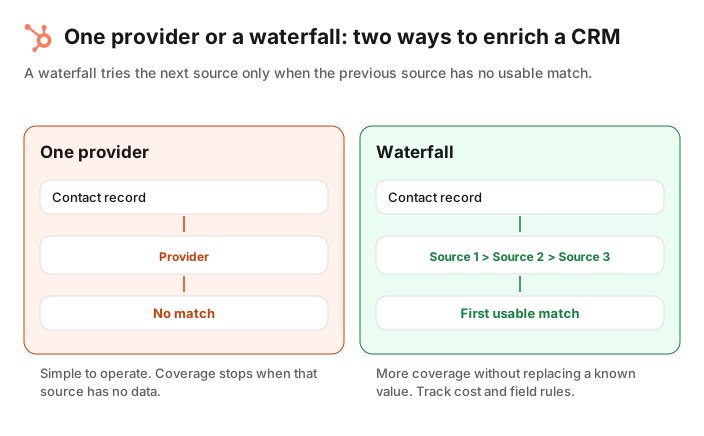
Run the same 100 to 500 records through each serious option. Split the sample by region, record age and input quality. Then count usable matches per field, not just contacts that received any update. Keep a small holdout group so you can inspect accuracy before an automated job writes across the CRM.
Create a Jipup account and connect HubSpot: start with a read-only audit, then fill the fields your team actually uses. 250 free credits, no credit card.
The best data enrichment tools for HubSpot at a glance
Short answer: HubSpot is the native starting point for eligible records. ZoomInfo, Apollo, Lusha and Cognism are established data platforms. Clay is for teams that want to assemble workflows. Dropcontact is worth testing for French data. Jipup is for teams that want a managed multi-source enrichment workflow inside their CRM.
The table is a decision map, not a ranking. Pricing and availability change, so use each linked vendor page for a current quote or plan before you buy.
| Tool | Approach | Best starting use case | Pricing model to check |
|---|---|---|---|
 HubSpot enrichment | Native enrichment | Filling eligible contact and company properties inside HubSpot | Subscription eligibility and credits |
 ZoomInfo | B2B data platform | Larger teams evaluating a broad commercial dataset | Sales quote |
 Apollo | Data platform plus sales workflow | Teams that want enrichment alongside prospecting and data health work | Plan and credits |
 Lusha | Contact data platform | Teams testing email and phone data with a free allowance | Credits and seats |
 Cognism | Commercial data platform | Teams evaluating international coverage and governance | Sales quote |
 Clay | Configurable workflow platform | RevOps teams willing to build and maintain a workflow | Credits, data providers and AI usage |
 Dropcontact | Contact-data specialist | Teams testing French and European records | Credits and plan |
 Jipup | Managed multi-source workflow | HubSpot teams that want enrichment and CRM data maintenance | Credits, billed only when data is found |
HubSpot enrichment
HubSpot is the first option to test if your records already have the inputs it requires. Its documentation says you can enrich contacts and companies individually or in bulk, configure enrichment properties, and set automatic enrichment. Automatic enrichment fills blank values rather than overwriting values set by a user or another system.
That makes it a sensible native layer for known contacts and companies. Check your subscription, permissions and the exact property behavior in your portal. Do not assume it will enrich personal email addresses or records with no usable domain, because HubSpot explicitly excludes those inputs.
ZoomInfo
ZoomInfo is a commercial B2B data platform that many larger revenue teams evaluate when data breadth, account context and an enterprise procurement model matter. Its data-enrichment page is the right place to confirm its current data, integration and quote details.
Test it with the fields you intend to use, especially direct dials, company attributes and the regions your team sells into. A broad database is valuable only if its returned values meet your definition of usable and can be written to the right HubSpot properties.
Apollo
Apollo positions its data-enrichment product around finding stale or incomplete contact and account data, scheduled enrichment jobs, CSV enrichment and API access. It also describes a data-health workflow that includes job changes and duplicates.
That can suit teams that want prospecting and enrichment in one environment. In a trial, separate the question of data coverage from the question of whether your team will actually use the wider workflow. Confirm the HubSpot field mapping and how the app handles a value that already exists.
Lusha
Lusha's pricing page documents a credit model: one credit for a verified email and five for a phone number, with up to 40 free credits per month on its free plan at the time of this guide. Its page also says the free plan includes its browser extension and CRM integrations.
That makes Lusha straightforward to test with a limited sample. Measure emails and phones separately. They have different costs and usefulness, and the records that matter most to your team may not be the records that match easily.
Cognism
Cognism is another commercial data platform to include when your evaluation depends on the countries you sell into and the governance your company requires. Review its current product information directly, then run your own regional sample. Do not accept a general claim about international coverage as an answer for your particular market.
Clay
Clay is different from a single database. Its pricing documentation describes credits for data and workflow usage, and its platform lets teams assemble enrichment steps from multiple sources. That flexibility is useful when RevOps wants to control the sequence, transformations and exceptions.
The trade-off is operational ownership. Someone must choose sources, maintain mappings, monitor usage and decide what happens on a conflict. Clay is a strong option for a team that wants to build that system. It is not automatically the lightest option for a team that only needs a safe, ongoing HubSpot refresh.
Dropcontact
Dropcontact is worth including in a France or Europe-focused evaluation. Confirm its current product and pricing details with the vendor, then test records from the legal entities, domains and languages you actually manage. A vendor can be a good fit for one market and a poor fit for another.
Jipup
Jipup is built for HubSpot teams that want to manage CRM data quality and enrichment from one workflow. On its enrichment page, Jipup explains that it can fill contact and company fields, uses several providers, and only bills a credit when data is found. It also says contact enrichment fills empty fields by default, with an explicit overwrite option for refreshes.
Use Jipup when you want a managed multi-source process rather than a separate provider contract and a hand-built sequence. Start with the free, read-only CRM audit, define the fields and scope, then test a representative sample before enabling writes. Jipup gives new accounts 250 free credits without a card.
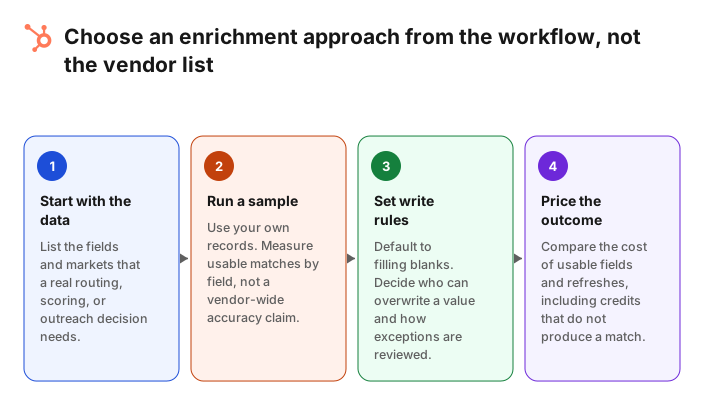
Single provider versus waterfall enrichment
Short answer: A single provider is easier to operate. A waterfall checks another source when the first has no usable match, which can improve coverage. The right choice depends on whether your team can govern source order, costs, field conflicts and the records that need review.
A waterfall does not mean writing the first value you see into every property. It means setting a controlled sequence: try a source, validate the returned field, then try the next source only when the first cannot provide a usable result. The CRM needs rules for empty values, overwrite permissions, duplicates and exceptions.
You can build this kind of workflow yourself in a platform such as Clay, with the maintenance that implies. Or you can use a managed approach such as Jipup. Jipup's enrichment page describes a multi-provider process, but you should still review which fields are in scope and how a result is written before you automate it.
The best proof is a test on your own data. Compare a single-source trial with a waterfall on the same sample. Record matches for each required field, the percentage you accepted after review, the cost of successful outputs and the records that still need a person.
Which tool is right for your team ?
Short answer: Use the native option when it covers the records you have. Choose a commercial platform when its coverage meets a specific sales need. Build a workflow when you have an owner for it. Choose a managed waterfall when broad coverage and safe CRM writes matter more than owning every enrichment step.
- A small team working entirely in HubSpot: test HubSpot enrichment first. Add a specialist only for the fields HubSpot does not return for your records.
- A team that needs prospecting and enrichment in one place: compare Apollo and Lusha with the actual records and fields used by sales.
- A larger team with formal procurement and broad data needs: include ZoomInfo and Cognism, then test geographical coverage rather than relying on database-size claims.
- A RevOps team that wants to design every enrichment step: test Clay, with an owner assigned to maintain sources, mappings and spend.
- A HubSpot team that needs a continuous, multi-source data workflow: test Jipup's audit and scoped enrichment process. Keep the first rollout narrow and review exceptions.
FAQ
What is the best data enrichment tool for HubSpot ?
There is no universal winner. HubSpot is a logical baseline for eligible contacts and companies. The best next tool depends on your fields, markets, data inputs, required workflow and the write rules your team can govern.
Does HubSpot have built-in data enrichment ?
Yes. HubSpot documents enrichment for contacts and companies, subject to subscription, permissions and input requirements. Contacts need a business email and companies need a company domain. Check the official documentation for the current property and overwrite behavior.
What is waterfall enrichment ?
Waterfall enrichment checks more than one data source in sequence. The next source is used only when the earlier source cannot provide a usable match. It can improve coverage, but it needs explicit rules for costs, conflict handling and CRM writes.
How should enrichment tools update HubSpot properties ?
Start by filling blank properties. Set an explicit rule for overwriting a value, record the source where possible, and send uncertain or conflicting results to a review queue. Test the mapping on a small set of records before scheduling a bulk job.
How much do data enrichment tools cost ?
Models vary: some vendors sell seats, some sell credits, and some quote annual contracts. Compare the cost per accepted email, phone number or company field on your own data. A low entry price is not useful if the fields you need do not match.
Is enriched data GDPR compliant ?
Compliance depends on your data purpose, legal basis, notices, opt-out process, vendors and location. Ask each vendor for its current documentation and involve the person responsible for your privacy program before using enriched data in a campaign.
Where Jipup fits
Create a Jipup account and connect HubSpot: start with a read-only audit, then fill the fields your team actually uses. 250 free credits, no credit card.

Co-founder of Jipup, the AI agent that keeps HubSpot CRMs clean, up to date and enriched. He works every week with RevOps and sales teams on their CRM data.