 HubSpot
 Jipup
What are HubSpot Breeze agents ?
Short answer: HubSpot calls its workspace for pre-built and custom agents Agent Hub. In that workspace, a team can activate, configure and monitor agents, then run custom agents from a workflow or a CRM card. Breeze is the wider HubSpot AI product name you may still see in search results and product pages.
The terminology changes quickly, which makes this topic harder than it needs to be. If you search for HubSpot Breeze agents, you may find older references to Breeze Studio alongside current references to Agent Hub. The practical question is simpler: can an agent use the data, take the actions and follow the review rules your process needs ?
HubSpot's current Agent Hub overview describes one workspace for pre-built agents, custom agents and agentic workflows. Its agent builder guide explains that a custom agent is configured with instructions, actions, knowledge and inputs. It can use HubSpot actions, default actions such as browsing the web or reading CRM records, and connectors based on MCP.
The first three Google results for this query are broad HubSpot or Breeze overviews. They explain that Breeze is an AI suite, but they do not give a RevOps team a decision rule for a data-quality workflow. This guide gives you that rule, plus a small pilot you can run before committing a production process.
When a HubSpot agent is the right starting point
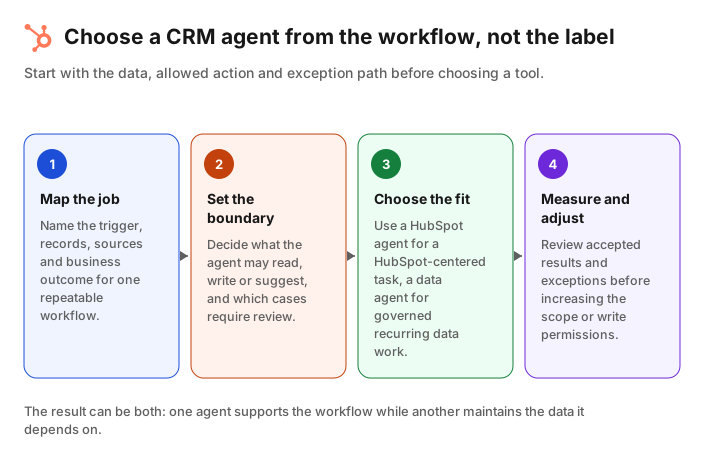
Short answer: Start with a HubSpot agent when the workflow is already defined in HubSpot, the records and context it needs are available there, and the result can be reviewed by the team that owns the process. A focused workflow is easier to test than an agent asked to fix every data problem at once.
HubSpot's native option is attractive when the work belongs in an existing HubSpot operating rhythm. Examples include preparing account research for a rep, creating a structured summary from recent CRM activity, or producing a suggested next step for a record owner.
The agent builder lets an administrator choose an agent's instructions, inputs, knowledge and actions. The HubSpot documentation also shows that agents can be made available from workflows and CRM cards. This makes a native agent a practical option when the trigger, owner and place to review output are already clear.
Use HubSpot first when these statements are true:
- The trigger is a HubSpot event or record state, such as a new deal, a stale task or a property that needs research.
- The team can name the records and fields the agent should read.
- The output has a clear owner, for example a sales rep, RevOps manager or support lead.
- A person can review the result before an important change or outreach action.
- The workflow can be tested on a small saved view without changing unrelated records.
This is not a reason to turn every workflow into an agent. A deterministic process with a known condition and known action may be better as a normal workflow. HubSpot itself makes that distinction in its guide to choosing agents or workflows. Use an agent where the job requires judgment across context. Use a workflow where the rule is stable and explicit.
Where a dedicated CRM data agent fits
Short answer: A dedicated CRM data agent fits when the repeatable job is data quality: detecting duplicates, refreshing stale records, filling governed gaps and sending uncertain cases to review. The key requirement is not that the agent is separate from HubSpot. It is that its data rules, write scope and exceptions are defined.
Data quality is a different job from drafting an answer or researching one account. It is recurring work across many contacts and companies. A useful process needs to specify what counts as a reliable source, whether the agent may fill only blank values or also replace values, how often the job runs, and what happens when the evidence conflicts.
HubSpot's own Data Agent focuses on account research, signals and smart properties. According to its product page, smart properties can use CRM activity, calls, emails, meetings and the web, then write an answer to a record on a set refresh cadence. HubSpot says Data Agent works with accounts and contacts already in the CRM, while Buyer Intent can surface new companies for team review. That can be useful for sales research. It is not automatically a full data-governance policy.
A dedicated agent is worth considering when the process needs a clear operational layer around data, for example:
| Requirement | Why it changes the choice |
|---|---|
| Find and review duplicates | Merging records changes reporting history and associations. The matching rule and exception queue need to be explicit. |
| Refresh job changes | A title, employer or email can become stale on a record that is otherwise still active. Define the evidence required before a write. |
| Enrich contacts and companies | Set field-level rules: which blanks can be filled, which values need review and which source wins. |
| Keep more than one CRM aligned | The source, destination and owner must be defined for each system rather than assumed from one portal. |
| Run a recurring data audit | A team needs a count of affected records, accepted changes and unresolved exceptions, not just one-off answers. |
Jipup is designed for this second category of work. Its Agents space supports recurring CRM data tasks such as duplicate review and merging, job changes, new hires and contact or company enrichment. Its Tables space is for more manual, on-demand enrichment. Jipup connects natively to HubSpot and Salesforce. The agent does not replace the data policy. It applies the policy that the RevOps team has agreed to.
Create a Jipup account and connect HubSpot for a free read-only CRM audit. Find duplicate, stale and incomplete records before you set up an agent. 250 free credits, no credit card.
A practical decision framework
Short answer: Choose by four things: where the source data lives, what the agent is allowed to change, how often it must run, and who reviews exceptions. If the answer is unclear, the process is not ready for either kind of agent.
Use this comparison during a process review. It is intentionally about operating constraints, not feature checkboxes.
| Decision question | A HubSpot agent is often a good fit when | A dedicated CRM data agent is often a good fit when |
|---|---|---|
| Where is the useful context ? | The work is centered on HubSpot records and the sources you have configured there. | The job needs a governed data process across contacts, companies or connected CRM systems. |
| What should happen after the answer ? | A record owner reviews a summary, suggestion or research output in HubSpot. | The process detects, enriches or updates data under field-level rules and routes exceptions for review. |
| How often does it run ? | It runs from a record, workflow or a specific team request. | It repeats as part of a data maintenance cadence with a measurable backlog. |
| What is the risk of a bad output ? | The output is advisory and easy for the owner to correct. | A wrong merge, overwrite or stale value can affect routing, reporting or customer history, so evidence and exceptions must be logged. |
| What should the team measure ? | Adoption, response time and the usefulness of the suggested output. | Records scanned, changes accepted, exceptions, data coverage and repeat defects. |
The outcome can be both. A HubSpot agent can help a seller understand an account, while a dedicated data agent keeps the contact and company records behind that account current. Do not force both jobs into one prompt only because they use the same CRM.
How to run a safe two-week pilot
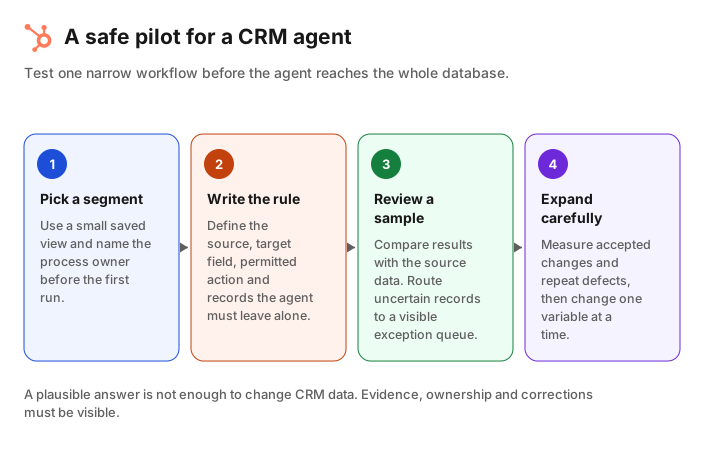
Short answer: Test one job on a small segment for two weeks. Define the source, target field, permitted action and reviewer before the first run. Compare a sample with human review, then decide whether to expand, change the rule or stop.
A pilot should answer whether the process is useful, not whether the agent can generate impressive text. Pick one workflow with an owner and a measurable outcome. For example, identify contacts with stale job information in active target accounts, or prepare account context for deals that have no next step.
- Choose the segment. Use a saved view or a small list. Exclude customers, employees and records with active data remediation unless they belong in the test.
- Write the data rule. State the trigger, source, target property, allowed write action and reviewer. For a data workflow, include what the agent must never overwrite.
- Set a review route. Give one person or team the responsibility to accept, reject or correct each uncertain result. A queue without an owner is not a control.
- Run in review mode first. For a week, collect suggestions and compare a sample with the source data. Do not treat a plausible answer as proof that a record should change.
- Measure the exceptions. Count records processed, accepted results, rejected results, missing evidence and repeated failure patterns. Read the rejected sample, not only the acceptance rate.
- Expand one variable at a time. Increase the segment, add a field or allow a new action, but not all three in one release. Keep a way to undo or correct changes.
If you use HubSpot credits, include them in the pilot design. HubSpot states that Data Agent, Customer Agent and Prospecting Agent are among the usage-based features that require HubSpot Credits. Its credits page also explains that administrators can review usage by feature and pause usage. Review the cost per useful outcome, not only the total consumption.
For a monthly maintenance plan, pair the pilot with a CRM hygiene checklist. That creates a regular moment to review duplicates, required fields, stale data and exception trends instead of treating data quality as a one-time clean-up.
Common mistakes when comparing CRM agents
Short answer: The most common mistake is asking which agent is “best” before defining the record, action and owner. The second is letting an agent write broadly before the team has inspected its exceptions.
Avoid these traps:
- Comparing labels instead of workflows. “Breeze,” “Agent Hub,” “AI agent” and “data agent” are product labels. Write down the business trigger and desired outcome first.
- Giving an agent a vague cleaning brief. “Fix our CRM” has no safe definition. Start with one object, a few fields and a documented source rule.
- Skipping the exception queue. Conflicts and missing information are normal. A reliable process makes those cases visible rather than forcing a guess.
- Measuring activity instead of accuracy. Hundreds of processed records mean little if owners reject the changes or if the same fields become stale again.
- Ignoring access and review settings. HubSpot documents that agent configuration depends on permissions and AI settings. Check those controls before you let an agent work with CRM data.
The agent should reduce manual work without making the data harder to trust. If the team cannot explain where a value came from or why it changed, pause the workflow and improve the rule.
FAQ
Is HubSpot Breeze the same as Agent Hub ?
Breeze is HubSpot's wider AI product name. Agent Hub is the current workspace HubSpot documents for viewing, configuring and monitoring pre-built and custom agents. Older Breeze terminology may still appear in search results and older pages.
Can a HubSpot agent update CRM records ?
HubSpot's agent builder documentation lists HubSpot actions and default actions for reading and writing CRM records. The exact action, permissions and review behavior should be checked in your portal before a process is enabled.
When should I use a workflow instead of an agent ?
Use a workflow when the condition and action are deterministic, such as assigning a record when a required field is blank. Use an agent when the process needs context or judgment, then keep its instructions, permissions and review route explicit.
Does HubSpot Data Agent replace CRM data hygiene ?
No. HubSpot Data Agent can help research and maintain context on existing CRM records. Data hygiene still requires a policy for duplicates, required fields, sources, refresh timing, allowed changes and exception handling.
Can Jipup work alongside HubSpot agents ?
Yes. A team can use a HubSpot agent for work centered on a record or a workflow, while Jipup agents handle recurring CRM data work such as duplicates, job changes and enrichment. The right split depends on the workflow and review rule.
How do I know whether an agent pilot worked ?
Review a representative sample with the process owner. Track accepted results, rejected results, exceptions, time saved and the business outcome the workflow was meant to improve. Expand only after the team can explain the changes and correct failures.
Where Jipup fits
Create a Jipup account and connect HubSpot for a free read-only CRM audit. Find duplicate, stale and incomplete records before you set up an agent. 250 free credits, no credit card.

Co-founder of Jipup, the AI agent that keeps HubSpot CRMs clean, up to date and enriched. He works every week with RevOps and sales teams on their CRM data.