 HubSpot
What are sales signals ?
Short answer: Sales signals are recorded behaviors or business changes that may justify a closer look at an account. A pricing-page revisit, an event registration, a reply, a new executive hire or a stalled renewal can all be signals. Their value comes from the account context and the response rule, not from the event alone.
A sales signal is not a magic score that says a buyer is ready. It is a piece of evidence that helps your team choose where to spend attention. The same action can mean very different things depending on the account, the person and the timing.
For example, a contact downloading a comparison guide may be useful if they already own the relevant process and have spoken with sales. It is weaker if the contact is a student, a recruiter or an existing customer researching a different team. A company hiring a RevOps leader can be relevant to a crm data product, but it is not proof that the person is evaluating one today.
The first three Google results focus mostly on long lists of behavioral buying signals, such as website visits, content downloads, email replies and questions about pricing. That is a useful inventory. What those lists often leave out is an operating rule: how to verify a signal, decide who owns it, and avoid turning every click into a sales task.
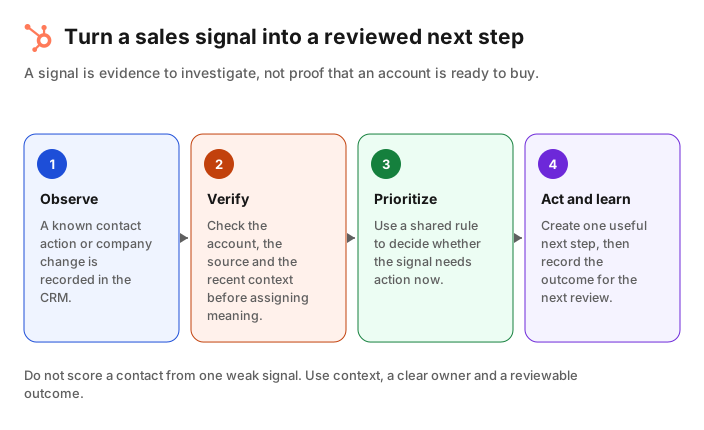
The sales signals worth tracking first
Short answer: Start with signals that your team can identify reliably and act on consistently. Direct replies, meeting requests, high-intent form submissions and changes in an open opportunity are usually clearer than anonymous browsing. Add company-change signals only when you can verify the account and the person behind them.
Use a small number of signal families rather than one long, noisy feed:
| Signal family | Examples | First question to ask |
|---|---|---|
| Direct intent | Demo request, reply asking for pricing, request for security documentation | Is this the right contact and account for the sales team ? |
| Product or content engagement | Pricing-page visit, integration-page visit, case-study download, webinar registration | Is this repeated or connected to a known opportunity ? |
| Opportunity movement | Deal with no next step, close date moved, new stakeholder associated | What changed, and who should follow up ? |
| Account change | New leader hired, funding announcement, expansion into a new market | Does the change affect the problem we solve for this account ? |
| Data-quality signal | Bounced work email, changed job title, missing company domain | Should the crm record be corrected before anyone acts on it ? |
Direct signals deserve the shortest path to a response because the buyer initiated the interaction. A reply asking about implementation or a form that requests a demo is not the same as an anonymous page view. Make sure that your routing rule preserves that difference.
Account changes can be valuable earlier in the buying process. A new sales operations leader may be reviewing tooling, building a team or simply updating a profile. Treat the event as a research cue. Confirm the company, role, segment and current crm history before assigning a task.
Create a Jipup account and connect HubSpot for a free read-only CRM audit. Find data gaps and stale records before you build a signal workflow. 250 free credits, no credit card.
Verify a signal before you create a task
Short answer: Before a signal becomes a task, verify the identity, the source and the account context. Check whether the contact is already a customer, whether there is an open deal, what the last interaction was, and whether the event can be explained by something else.
A reliable signal workflow begins with questions a person can answer:
- Who is the contact ? Match the event to a known person and company. Do not assign an anonymous visit to an account based only on a shared office IP address or a guessed domain.
- Where did the event come from ? Keep the original source, such as a form, email platform, event tool or enrichment provider. A field that says only "high intent" cannot be reviewed later.
- What is already happening ? Check open deals, recent emails, meetings, owners and lifecycle stage. A demo request from an active opportunity should reach the deal owner, not a generic queue.
- What would make the signal false or irrelevant ? Exclude employees, partners, competitors, students and current customers when the intended motion is new business.
- What is the smallest helpful action ? The next step might be a researched email, a call task, a data correction or no action at all.
HubSpot can store the context needed for this review. Its record association documentation explains how contacts, companies, deals and other records are linked. Its workflows documentation explains how enrollment and actions can route records. Use the workflow to make the signal visible, not to assume the sale is won.
A practical rule is to require at least two pieces of context before escalating a weak signal. For instance, a pricing-page view becomes more useful when it is paired with an existing target account and a recent return visit, or with an open opportunity whose close date is approaching. The exact threshold is your sales policy. Write it down and review it when the team sees too many low-quality tasks.
Score signals without hiding the reason
Short answer: A score can help prioritize work, but every score should be explainable. Keep the events, weights, exclusions and time window visible. If a rep cannot tell why an account scored highly, the score is not a useful instruction.
Scoring is a way to order a queue. It should not replace account research. A simple model is easier to audit than a complicated one:
| Rule | Example treatment | Why it is useful |
|---|---|---|
| Give direct intent a strong weight | A demo request enters the owner queue immediately | The contact chose to identify themselves |
| Add context, not noise | A second relevant action inside 14 days raises priority | Repeated behavior is more informative than one click |
| Reduce stale activity | Older engagement loses weight over time | Last quarter's visit should not outrank this week's reply |
| Exclude the wrong audience | Employee, partner and current-customer domains do not enter new-business routing | It avoids a queue full of false positives |
| Show the evidence | The task includes the event, date and record links | The owner can decide quickly |
Do not use a score to overwrite lifecycle stage, ownership or deal stage without review. Those properties affect reporting and handoffs. Let the score create a suggested next step, then leave the business decision to the owner.
HubSpot's lead scoring documentation describes engagement, fit and combined score options. Check the feature availability for your subscription before designing a process around it. Whether you use a native score or a custom property, keep a test segment and compare the score against outcomes before you route the entire database.
Turn a signal into a useful next step
Short answer: The best response depends on the signal type. Send direct intent to the responsible owner quickly. Turn company changes into research prompts. Use data-quality signals to repair the record. Do not send a generic message just because a score crossed a threshold.
Here is a response map a small B2B sales team can use:
| When this happens | Owner sees | Useful next step |
|---|---|---|
| A known contact requests a demo | Contact, company, form answers and open deal status | Confirm routing and respond with the relevant meeting option |
| A target account returns to pricing and integration pages | Recent pages, account owner and last activity | Review the account, then send a specific follow-up only if there is a real conversation to continue |
| A champion changes jobs | Old employer, new employer and prior opportunity history | Update the crm record, then research the new company before any outreach |
| An opportunity has no activity near its close date | Deal owner, next step, last meeting and close date | Ask the owner to add a next step or reset the forecast |
| A work email bounces | Contact record, company domain and email source | Verify the person and correct the record before starting a sequence |
This approach keeps signals connected to the crm rather than trapped in separate dashboards. It also gives the team feedback. If a repeated signal leads to no useful conversation, lower its priority or change the response. If a signal reliably reaches accounts that are already in a relevant evaluation, make the evidence easier for the owner to see.
Jipup can support the data side of that workflow. Its agents can identify job changes, enrichment gaps, duplicate records and missing contact or company data in HubSpot and Salesforce. That does not decide which account should receive outreach. It gives your team a more current record before they decide.
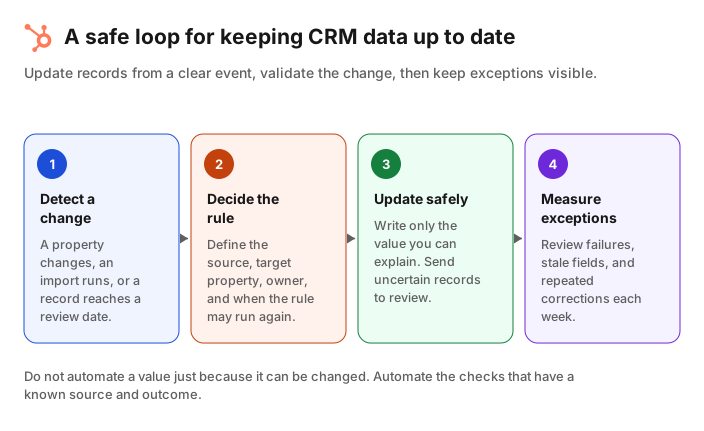
Measure whether your sales signals help
Short answer: Measure the quality of a signal by the work and outcomes it creates, not by the number of alerts. Track how many signals were reviewed, accepted, rejected, acted on and linked to a meaningful next stage.
Start with a weekly review for every new signal rule. Look for four things:
- Volume: How many records entered the queue ? A large increase can mean a tracking change rather than new demand.
- Acceptance: How often did an owner agree that the signal deserved action ? Low acceptance means the rule is too broad, poorly matched or missing exclusions.
- Speed: How long did it take to review direct intent ? Fast response matters more here than a sophisticated score.
- Outcome: Did the action produce a meeting, a qualified opportunity, an updated record or a documented disqualification ? Keep the outcome attached to the rule.
Separate correlation from causation. People who visit a pricing page may be interested, but a page visit did not necessarily create the opportunity. The point of measurement is not to claim certainty. It is to find which evidence helps your team use its time well.
For a monthly crm hygiene routine, review the signals that depend on contact data too. A stale title, a duplicate company or a missing domain can route the right event to the wrong person. The CRM hygiene checklist explains how to review those data issues in a repeatable cycle.
FAQ
What are examples of sales signals ?
Examples include a demo request, a reply asking about pricing, a repeated visit to a relevant product page, an event registration, a new executive hire, a close-date change and a bounced work email. The event becomes useful only after the account context is checked.
Are buying signals and sales signals the same thing ?
They are often used for the same idea: observable evidence that an account may deserve attention. In practice, teams may call direct buyer behavior a buying signal and account or crm changes a sales signal. What matters is defining the response rule.
Should I contact every prospect who visits a pricing page ?
No. A pricing-page visit alone may be anonymous or unrelated to an active buying process. Check whether the visitor is a known contact, whether the account fits, whether there is recent activity and whether a relevant follow-up would help.
How many sales signals should a team track ?
Begin with three to five signals that have clear sources and owners. Add more only when the team can explain how each one is verified, prioritized and measured. A small trusted queue is better than a long alert feed.
Can HubSpot score sales signals ?
HubSpot supports lead scoring for engagement, fit and combined criteria, subject to your subscription and configuration. Use a score to prioritize review, and keep the events and exclusions visible to the person who owns the next step.
How can Jipup help with sales signals ?
Jipup helps keep the crm data behind a signal current by identifying data gaps, job changes, duplicates and enrichment needs. The sales team still defines which events matter and reviews the action taken.
Where Jipup fits
Create a Jipup account and connect HubSpot for a free read-only CRM audit. Find data gaps and stale records before you build a signal workflow. 250 free credits, no credit card.

Co-founder of Jipup, the AI agent that keeps HubSpot CRMs clean, up to date and enriched. He works every week with RevOps and sales teams on their CRM data.