 Clay
 HubSpot
 Jipup
Waterfall enrichment is useful when one data source cannot reliably fill the fields your team needs. Instead of sending every record to every provider, a workflow tries a source, checks whether the result is usable, then tries the next source only for the remaining gaps.
That sequence sounds simple. The difficult part is deciding what “usable” means before the workflow writes to your CRM. A returned work email may be unvalidated. A company-size value may be old. Two sources may disagree on a job title. If the rules are unclear, a waterfall can turn a missing value into a wrong value at scale.
This guide gives you a practical way to design and test a waterfall. It focuses on the decisions most tool comparisons skip: the inputs that make a record eligible, when a result should stop the sequence, and how to measure an outcome your team can trust.
What is waterfall enrichment ?
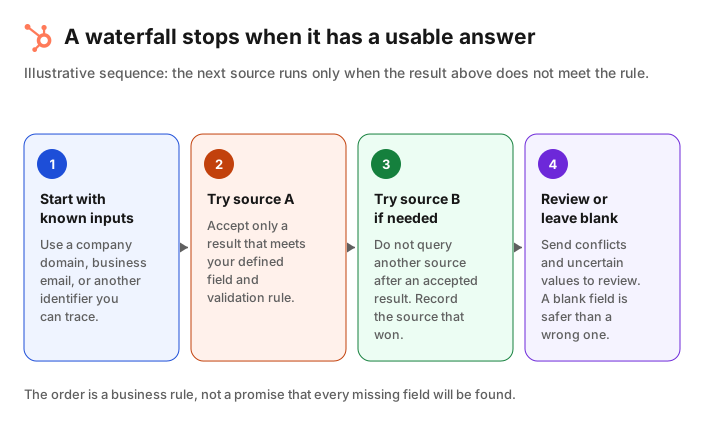
Short answer: Waterfall enrichment queries multiple data sources in a set order. A record moves to the next source only when the previous source has not returned a result that meets the field's acceptance rule. The aim is better usable coverage without paying for duplicate lookups.
A waterfall is not a list of vendors run in parallel. It is conditional logic. For a missing work email, the sequence might attempt a low-cost source, validate the result, and only then move to another source if the email is absent or fails validation. For a company field, the condition could be a known domain, a matching legal entity, or a value recent enough for the intended use.
Clay's waterfall documentation describes this model as using multiple providers in a predetermined sequence, with the ability to set the inputs and provider order. Its work-email waterfall documentation makes the stopping rule explicit: the sequence stops when it finds a valid result.
That distinction matters. More provider calls do not automatically create better CRM data. The extra source should be a fallback for a defined gap, not a way to overwrite a value that a person or a trusted process already set.
When is a waterfall worth the extra setup ?
Short answer: Use a waterfall when the same missing field blocks a real CRM workflow and a single source leaves a meaningful number of eligible records unresolved. Start with a small sample. If the waterfall does not improve accepted values enough to justify the extra cost and ownership, keep the simpler process.
A single provider is often the right starting point. It has one contract, one mapping and one set of behavior to monitor. Add a waterfall only when you can name the gap it is meant to solve.
Typical examples include:
- Work emails for contacts that already have a full name and company domain.
- Direct dials for a defined segment, where your team has a clear compliance and outreach policy.
- Company firmographics that determine routing, scoring or territory assignment.
- A refresh of selected values that become stale, such as job title or employee range.
HubSpot's native enrichment is a useful baseline for teams already working in HubSpot. Its current enrichment documentation says contacts need a business email and companies need a company domain. It also distinguishes automatic enrichment, which fills blank properties, from manual enrichment, which can fill blanks or overwrite existing values, and continuous enrichment for values previously enriched. Those eligibility and overwrite rules are a good model even if you use another tool.
A waterfall is less useful when the input is too weak to identify a record, when the field has no operational use, or when nobody owns exceptions. Do not spend credits trying to enrich every empty property just because the property exists.
Connect HubSpot to Jipup for a read-only CRM audit, then choose the fields and records to enrich. New accounts receive 250 free credits, with no card required.
How waterfall enrichment works, step by step
Short answer: Define one target field and its accepted outcome, choose the available inputs, order sources by evidence and cost, validate each result, then record the source and write only according to a pre-agreed CRM rule.
Here is a practical setup for one field, such as a work email.
- Define the decision the field supports. Write down why the field is needed. For example, a verified work email may be required before a contact enters an outbound review queue. A field without a decision behind it is hard to evaluate later.
- Set the minimum inputs. A full name plus company domain is stronger than a name alone. If the input cannot distinguish two people, route the record to review instead of enriching it automatically.
- Write the acceptance rule. For work email, decide whether a result must pass a validator, how to treat catch-all domains, and whether a personal address is out of scope. For a company field, decide which source and recency signals are sufficient.
- Choose a source order. Put sources in an order that reflects your market, required field, evidence quality and cost. Do not copy a generic order from another company. A source that works well for US SaaS companies may perform poorly for your European customer segment.
- Stop when the rule is met. A result should end the sequence only if it passes the agreed rule. If a provider returns an email that fails validation, the workflow can continue. If it returns an accepted value, later sources should not run just to seek a different answer.
- Keep provenance and exceptions visible. Store the winning source and date where your process allows it. Route conflicting results, weak inputs and failed validation to a review list. A blank field is often safer than an unexplained value.
Clay documents optional output of the successful provider in a waterfall. That is a sensible control for any implementation because it lets your team inspect where a value came from and compare source performance over time.
How should you order enrichment sources ?
Short answer: Start with the source most likely to return an acceptable value for your specific records at a sensible cost. Use historical tests, not vendor-wide claims. Put validation before the CRM write, and put review before an overwrite.
There is no universal best order. The right sequence depends on the field, geography, company size, available identifiers and tolerance for risk. For example, an email waterfall for outbound should usually apply a stricter acceptance rule than an internal research workflow. A job-title refresh may need a freshness check that a country field does not.
Use this decision table to make the order explicit:
| Question | Rule to define before you run the waterfall | Example |
|---|---|---|
| Which records enter ? | Minimum identifiers and segment | Full name plus company domain, in your target market |
| What counts as a match ? | Validation and field-specific quality threshold | Verified work email, not a personal mailbox |
| Which source goes first ? | Expected usable coverage, cost and evidence quality | Source strongest on your target geography and field |
| When does it stop ? | The condition that accepts a result | Validation succeeds and the field is blank |
| What can it overwrite ? | Explicit property ownership rule | Never overwrite a human-entered email automatically |
| What needs review ? | Conflict and exception criteria | Two sources identify different companies for the same domain |
The order needs maintenance. A provider's coverage can change, and your CRM can shift toward a different geography or segment. Review source-level outcomes on a schedule that matches the volume and business impact of the workflow.
Coverage is not the same as data quality
Short answer: A field returned by a provider is not automatically a field your team should use. Measure accepted values after validation and review, not only the percentage of records that received any value.
This is where many waterfall evaluations go wrong. A provider may report a match, but the value can still be unsuitable for your workflow. An email may be risky to send to. A company may be incorrectly matched. A title may be stale. If you count all returned values as wins, the waterfall will look better than it is.
Run a controlled test before you automate a large segment:
- Select 100 to 500 records that resemble the segment you plan to enrich. Include different regions, record ages and input quality levels.
- Define the required fields and acceptance rules before running any provider.
- Run the single-source baseline and waterfall on equivalent samples or a safely split sample.
- Review a meaningful subset of results against the evidence you use in practice.
- Compare accepted values, not just returned values, and calculate the cost per accepted field.
- List the exceptions: weak identifiers, conflicting results, records with no result, and cases a human corrected.
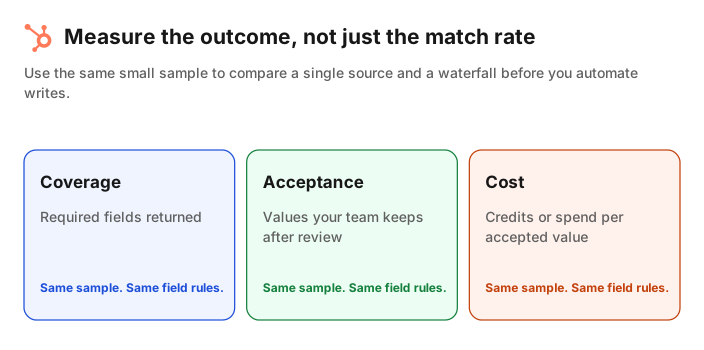
The comparison is more useful when it includes the action the data supports. If the email is only needed for a carefully reviewed sales queue, an unvalidated but filled property has little value. If the company field controls territory routing, a wrong match may cost more than a missing value. Design the metric around the risk of being wrong.
How to write waterfall results to HubSpot safely
Short answer: Default to filling blank fields, keep an explicit overwrite rule, and test mappings on a small segment before you schedule a wider run. Make it easy to see what changed and to review exceptions.
HubSpot's documentation provides a helpful precedent: automatic enrichment fills blank properties and does not overwrite values set by a user or another system. A waterfall should have the same kind of restraint unless your team has explicitly defined a refresh policy.
For a safe first rollout:
- Use a saved segment or small list rather than the whole CRM.
- Map each incoming field to a named HubSpot property and confirm the property owner.
- Default to blank-only writes for the first run.
- Keep the source, run date and result status available to the team that reviews data quality.
- Send conflicts to a queue instead of choosing a winner silently.
- Review the before-and-after changes before increasing the segment or enabling a schedule.
If you do not want to build and maintain a provider sequence yourself, Jipup offers a managed multi-source enrichment workflow for CRM data. Start with its free, read-only CRM audit, scope the records and fields, then review the result before enabling writes. Jipup is one option among several. The important control is the same in every tool: a workflow must make its source, target property and exception path clear.
Waterfall enrichment versus a single provider
Short answer: A single provider wins on simplicity. A waterfall can win on usable coverage when its fallback sources fill meaningful gaps without creating duplicate cost or uncontrolled writes. The decision should come from a test on your records.
| Approach | Strength | Trade-off | Best starting case |
|---|---|---|---|
| Single provider | Fastest to set up and monitor | Coverage stops at one dataset | One field, one clear target segment, good baseline results |
| Waterfall you build | More control over source order and field rules | Requires ownership of sources, credits, mappings and exceptions | RevOps team with time to operate and improve the workflow |
| Managed multi-source workflow | Less operational work for the team using the result | You still need to define scope and review write behavior | CRM team that wants ongoing enrichment without maintaining each source |
The right answer can change as your CRM and market change. Keep the initial scope narrow, review accepted outcomes, and only add complexity when the measured benefit is clear.
FAQ
What is waterfall enrichment in B2B ?
Waterfall enrichment is a process that tries several data sources in sequence for the same missing field. The workflow stops when a result meets its acceptance rule, or when it runs out of sources.
Does waterfall enrichment improve match rates ?
It can improve usable coverage because a later source can fill a gap left by an earlier one. It does not guarantee accuracy. Test accepted values on your own records and fields before treating a higher match rate as a win.
Should I validate emails in a waterfall ?
Yes, if the email will be used for outreach or another process where deliverability matters. Define what counts as valid before the run and continue to the next source when a returned email fails that rule.
Can a waterfall overwrite existing CRM data ?
It can, but that should be an explicit policy rather than a default. Start by filling blanks, protect values entered by people or trusted systems, and send conflicts to review.
How many providers should an enrichment waterfall use ?
Use only the sources that add a tested benefit for the field and segment. More providers can raise cost and conflict risk. Stop adding sources when the additional accepted values no longer justify the operational work and spend.
What should I track after launch ?
Track records entering the workflow, accepted values by field, source-level results, credits or spend per accepted value, validation failures, overwrites and exception-queue volume. Review those measures before changing source order or expanding scope.
Where Jipup fits
Connect HubSpot to Jipup for a read-only CRM audit, then choose the fields and records to enrich. New accounts receive 250 free credits, with no card required.

Co-founder of Jipup, the AI agent that keeps HubSpot CRMs clean, up to date and enriched. He works every week with RevOps and sales teams on their CRM data.