 HubSpot
 Jipup
Data enrichment is not a larger contact list. It is a controlled way to add context to the records you already own, then decide which of those values are safe enough to use. That distinction matters when an incorrect job title, old email, or guessed company match can send a workflow in the wrong direction.
What is data enrichment ?
Short answer: Data enrichment is the process of adding relevant information or updates to an existing record. In a B2B CRM, it can add a job title, work email, phone number, industry, company size, or location. A useful enrichment process also defines the source, matching input, write rule, and review path for every field.
The term is broad. Stitch defines data enrichment as improving raw data, while Acceldata describes adding new information and updates to an existing database. Both definitions are useful. For RevOps, the practical question is simpler: what extra value will make this record usable for a real decision ?
For example, a contact from a webinar may have a first name, last name, and work email. Enrichment can add their current job title, company industry, employee range, and location. That gives marketing fields for segmentation and gives sales a reason to route the record correctly. It does not prove that every returned value is current or suitable for outreach.
HubSpot's own data enrichment documentation describes a similar process: it uses limited business identifiers to find verified business information across its commercial dataset, third-party providers, and public information. For contacts, it uses first name, last name, and work email. For companies, it uses the company domain.
The distinction between adding context and trusting a value is where many projects fail. A data provider can return something for a record. Your team still needs to decide whether that result is useful, where it belongs, and whether it may replace a value entered by a person.
What data can you enrich in a CRM ?
Short answer: Start with fields that affect a decision your team already makes. Common B2B fields include a work email, phone number, job title, seniority, industry, employee range, country, company website, and company domain. Do not enrich every available field simply because a provider offers it.
The best fields depend on the workflow, not the vendor's property list. A sales team may need a verified work email and title before a first call. Marketing may need country, industry, and employee range to build a relevant segment. RevOps may need company domains and legal names to identify duplicates.
| Use case | Useful enriched fields | Decision it supports |
|---|---|---|
| Lead routing | Country, employee range, industry, owner region | Which team owns the record |
| Sales research | Job title, seniority, work email, phone | Whether the contact is the right person to approach |
| Segmentation | Industry, company size, location, technology context | Which message or campaign fits |
| Data quality | Company domain, legal name, address, source | Whether records are related or need review |
| Refreshing records | Current title, company, email status | Whether a workflow should be paused or updated |
HubSpot documents that its enrichment can be run on contacts and companies individually or in bulk, and that available properties can be reviewed in the record panel. Its enrichment settings guide also documents custom property mapping and an activity log. Those controls are useful because they make the source and timing of a CRM change reviewable.
Create a Jipup account and connect HubSpot or Salesforce. Start with a read-only audit, then choose the fields and records worth enriching. 250 free credits, no credit card.
How does data enrichment work ?
Short answer: A process begins with an identifier, such as a work email or company domain. A provider looks for a match, returns candidate fields, and the CRM applies the write rules you set. The safe version records the result, fills only approved fields, and sends conflicts or low-confidence matches to review.
Use this sequence before you automate anything:
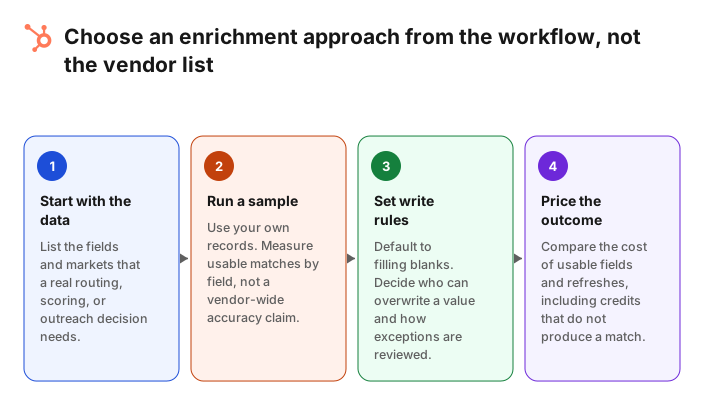
- Choose the outcome. Write the specific decision the new field should improve. For example, route new accounts by employee range, or stop sending to an invalid work email.
- Choose the starting identifier. A company domain and a business email are often stronger than a name alone. HubSpot states that its contact enrichment uses first name, last name, and work email, while company enrichment uses a domain.
- Define the allowed fields. Decide exactly which properties a provider may fill. A narrow first run is easier to evaluate than a full record overwrite.
- Set write rules. Default to filling empty fields. Require an explicit policy, source, and owner before a process can overwrite a human-entered value.
- Run a representative sample. Include records by region, record age, and input quality. Review returned values field by field, not only the number of matched records.
- Measure accepted results. Count values your team can actually use. A match is not a success if it lands in the wrong property or needs manual correction.
- Keep an exception path. Preserve records that did not match, produced conflicting data, or need a person to decide.
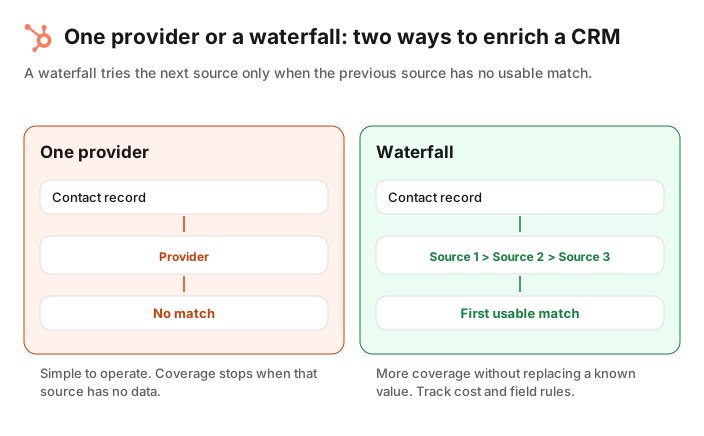
This is also why a single provider and a waterfall need different governance. A single provider stops when it has no match. A waterfall tries another source only when the previous one cannot return a usable value. It may improve coverage, but it needs clear rules for source order, cost, conflicts, and field ownership.
Data enrichment vs. data cleansing
Short answer: Enrichment adds useful context. Data cleansing fixes or removes values that should not be trusted, such as duplicates, invalid formats, and stale or inconsistent data. The two jobs overlap in a CRM, but they should not share the same success metric.
A common mistake is to enrich a messy CRM before deciding which records are safe to update. That can create a more complete version of the same duplicate or preserve a bad value because a field is no longer blank.
| Job | Main question | Typical actions | Example result |
|---|---|---|---|
| Data cleansing | Can we trust and use this record ? | Normalize formats, remove duplicates, flag invalid values | One clear company record with a usable domain |
| Data enrichment | What missing context would help a decision ? | Add title, industry, size, contact details, or updates | A routed account with the fields needed for its workflow |
| Data transformation | Is the data in the structure this system expects ? | Split names, map values, change dates or labels | A consistent property format across an import |
Start with basic quality checks: duplicate records, missing identifiers, inconsistent country values, and properties that have no current owner. Then enrich the fields that the next workflow needs. When an enrichment result conflicts with a trusted value, send it to a review queue rather than silently replacing the record.
Four data enrichment examples for B2B teams
Short answer: Good examples begin with a specific workflow. Add company size to route accounts, add job titles to segment a campaign, refresh a contact's company after a change, or add domains to help a deduplication review. Each example should state the source, fields, and human check.
1. Route new companies by fit
A company submits a form with a domain but no employee range or industry. Enrich those two fields, then use a documented routing rule. Keep an exception queue for records with no match, instead of assigning a guessed segment.
2. Segment contacts by role
A marketing team wants to invite CRM owners to a webinar. It can enrich titles and seniority, then create a list that is reviewed against a small sample. Do not treat a title match as proof that the contact is a decision-maker.
3. Refresh a record before an outreach sequence
A sales team can check whether a work email and company are still current before enrolling a contact. If the data conflicts with the CRM, pause the record for review. This reduces the risk of automating an assumption.
4. Prepare records for a data-quality project
A team with incomplete company domains can enrich the missing domain only, then use it as one signal in a duplicate review. A shared domain or a similar name is not enough on its own to merge two CRM records.
How to measure whether enrichment is working
Short answer: Measure accepted, usable values by field and workflow. Track coverage, validation failures, conflicts, review volume, and the outcome the field was meant to improve. Avoid using a vendor-wide match rate as your only metric.
A simple monthly scorecard can include:
- Coverage: the percentage of in-scope records that received an accepted value for a required field.
- Accuracy sample: the percentage of reviewed values that were correct enough for the intended workflow.
- Conflict rate: how often a returned value disagreed with an existing trusted value.
- Time to usable record: how long it takes a new record to reach the fields needed for routing or follow-up.
- Workflow outcome: for example, the percentage of records routed without manual research, not a generic claim about revenue.
Run the same sample through any options you are considering. Split it by country, company size, record age, and input quality. A tool can look strong on clean US company domains and perform differently on older records, personal email addresses, or an international segment.
Where Jipup fits
Jipup is for teams that want to improve CRM data without building and maintaining a separate sequence of providers and field mappings. Its enrichment workflow works inside HubSpot or Salesforce, and new accounts can start with a free, read-only CRM audit before choosing a scope. Jipup uses several providers and charges a credit only when data is found.
The right first rollout remains small: choose a field set, define whether blank values only can be filled, test representative records, and review exceptions. Enrichment becomes more valuable when it is part of an ongoing data-quality process, not a one-time upload.
FAQ
What is the difference between data enrichment and data cleansing ?
Data enrichment adds new context, such as a job title, industry, or company size. Data cleansing fixes, standardizes, deduplicates, or removes values that should not be trusted. Most CRM teams need both, in that order for the records they plan to automate.
How does data enrichment work in HubSpot ?
HubSpot says it uses limited business identifying information to find verified business information across its commercial dataset, third-party providers, and public information. Contact enrichment uses first name, last name, and work email, while company enrichment uses a company domain. Review the current HubSpot documentation because availability and settings can change.
What fields should I enrich first ?
Start with fields that support a decision already in your workflow. For many B2B teams, that means company domain, job title, industry, employee range, and a verified work email. Test each field on your own records before you automate a wider scope.
Is data enrichment accurate ?
It can be useful, but no returned value should be treated as automatically correct. Measure accuracy on a representative sample, preserve a source where possible, and create a review path for conflicts or uncertain matches.
Can data enrichment overwrite CRM data ?
It can, depending on the tool and settings. Treat overwrites as a separate policy from filling blanks. HubSpot documents enrichment settings and activity logging, and its record-level documentation shows available enrichment properties. Test the exact behavior in your portal before a bulk run.
Is enriched data compliant with privacy rules ?
Compliance depends on your purpose, lawful basis, notices, opt-out process, jurisdictions, vendors, and internal policies. Involve the person responsible for privacy before using enriched personal data in a campaign, and check each provider's current documentation.
Where Jipup fits
Create a Jipup account and connect HubSpot or Salesforce. Start with a read-only audit, then choose the fields and records worth enriching. 250 free credits, no credit card.

Co-founder of Jipup, the AI agent that keeps HubSpot CRMs clean, up to date and enriched. He works every week with RevOps and sales teams on their CRM data.